Overview
Getting started with the software development environment (SDE).
Getting started means installing the required software and programming the board with a provided blinky application. All steps are described in the details document.
Hardware requirements
- FRDM-MCXA153 board
- Type-C USB cable
Board settings
- Default
Preparation
- Connect the type-C USB cable between the host PC and the MCU-Link port (J15) on the target board.
- Build the application.
- Run or debug the application.
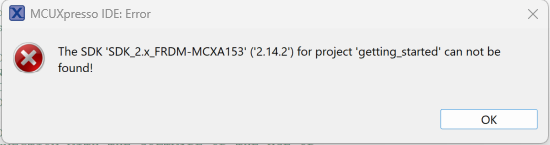
If the project cannot be build and the following message pops up, the SDK is not properly installed. Please read the Getting started.
Result
- The green RGB LED is blinking.