Cyclic scheduler
Resources: ese_general_examples\advanced\cyclic_scheduler
Goal
To know how to implement a cyclic executive with interrupts scheduler.
Introduction
In microcontroller applications the right thing should happen at the right time. Or at least before a given deadline. But what if the project becomes a large collection of functional modules? What options do we have to process the incoming events, while making sure the application remains responsive?
Several options exists that are beyond the scope of this course content. One option is to use a finite state-machine. Another option is a real-time operating system such as FreeRTOS. This course discusses yet another option: a cyclic executive with interrupt scheduler.
Cyclic executive with interrupt scheduler
There is a single CPU core in the MCXA153 microcontroller that can execute machine instructions. If multiple tasks need to be executed, the CPU time for executing instruction should be divided somehow between these tasks. This is called scheduling.
In a cyclic executive scheduler, all tasks take turn one after the other. This is depicted in the following image:
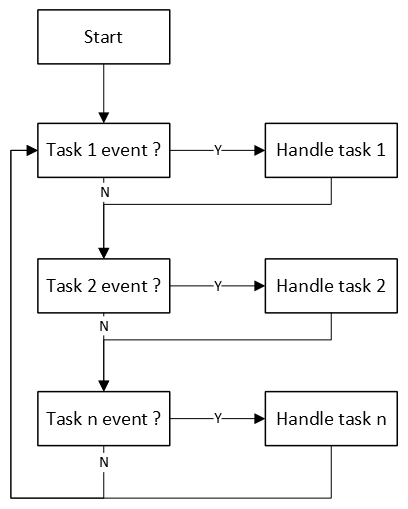
Two considerations for handling tasks are:
- Tasks are only executed if an event needs to be handled.
- Execution time of a task is as short as possible. This means, for example no delays. Instead of using delays, create a new event that is started in a task handler and finished when the timeout event occurs.
Tasks are checked and handled in a fixed order, hence the name cyclic executive. Events can be generated when handling a task, but more likely by interrupt handlers. In this type of scheduling, interrupts will always have priority over the task handlers!
When there are no events, the CPU will spend it's time doing nothing but checking if events occurred. In a fully interrupt driven application, the CPU can thus be put in sleep mode to reduce power consumption.
Example
The scheduler is implemented with if-statements in a endless while-loop in main. For example:
// -----------------------------------------------------------------------------
// Local variables
// -----------------------------------------------------------------------------
static volatile uint32_t ms = 0;
static uint32_t timeout = 0xFFFFFFFF;
static uint8_t color = 0;

// -----------------------------------------------------------------------------
// Main application
// -----------------------------------------------------------------------------
int main(void)
{
    gpio_input_init();
    gpio_output_init();
    lpuart0_init(9600);

    // Generate an interrupt every 1 ms
    SysTick_Config(48000);

    printf("Cyclic executive with interrupts scheduler");
    printf(" - %s\r\n", TARGETSTR);
    printf("Build %s %s\r\n", __DATE__, __TIME__);

    while(1)
    {
        // --------------------------------------------------------------------
        // Switch pressed event?
        if(gpio_input_sw3_pressed())
        {
            printf("[%08lu] event: switch pressed\r\n", ms);

            timeout = ms + 3000;

            const uint32_t lut[3] =  {(1<<13), (1<<12), (1<<0)};

            GPIO3->PCOR = lut[color];
        }

        // --------------------------------------------------------------------
        // Timeout event?
        if(ms >= timeout)
        {
            printf("[%08lu] event: timeout\r\n", ms);

            timeout = 0xFFFFFFFF;

            GPIO3->PSOR = (1<<0);
            GPIO3->PSOR = (1<<12);
            GPIO3->PSOR = (1<<13);
        }

        // --------------------------------------------------------------------
        // Incoming data event?
        if(lpuart0_rxcnt() > 0)
        {
            int data = lpuart0_getchar();

            printf("[%08lu] event: incoming data \'%c\'\r\n", ms, data);

            if(data == ' ')
            {
                printf("[%08lu] color updated\r\n", ms);
                color = (color == 2) ? 0 : color + 1;
            }
        }
    }
}
In the example, three events are handled:
- Switch pressed event
- Timeout event
- Incoming data event
If one of the events occurs, it is logged via serial with printf() and visualized on the RGB LED.
A major benefit of this design is that it is fairly easy to add the handling of more events.
Assignment
Add an event that is triggered every second. Reuse the ms counter for this purpose. Verify the result by printing a log message via serial.